Easy Release Pro
ApplicationGap LLCPhotography
4.249.00 Reviews
- Version
- 4.1.260404
- Installs
- 10.00K
- Age Rating
- Everyone
Screenshots
Our Review of Easy Release Pro
 Analysis by Appyee
I find the biggest hurdle with a release app is rarely tapping through a form; it is getting the right details, the right person, and a usable copy together while a shoot is already moving. Easy Release Pro is built for that specific job: creating model or property releases, collecting signatures digitally, and keeping the resulting documents organized. It is a photography app from ApplicationGap LLC, and I see its strongest case in work where releases are a routine part of the shoot rather than a once-a-year task.
Where a release workflow can snag
Before relying on a digital form, I would decide what information you need for the particular shoot and who needs to sign. A model release and a property release serve different situations, and a hurried setup can mean discovering too late that the form does not reflect the intended use. The app can help you prepare the document, but it cannot make that judgment for you. I would review the wording before inviting anyone to sign, especially when a client or publication has specific requirements.
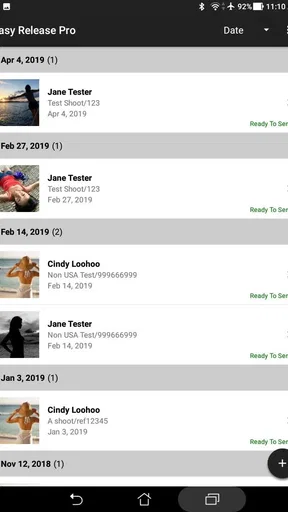
The other common friction point is the handoff. A release is only useful if the correct person completes it and you can later connect it to the right images or job. I recommend settling on a simple naming habit before the first shoot: use a project name and the subject’s name consistently in whatever records you keep. That small bit of discipline makes a cloud-stored collection easier to search than a folder full of documents with vague labels.
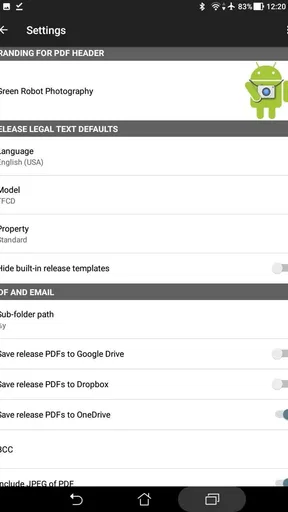
Easy Release Pro supports multiple languages, which can make the signing conversation smoother when a subject is more comfortable reading another language. I would still check that the selected language and the intended document are the ones you meant to use before handing over the device. A language option is useful, but it does not replace explaining what the release authorizes in plain language.
Setup checks before the first signature
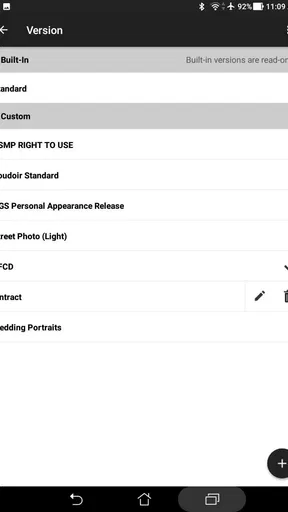
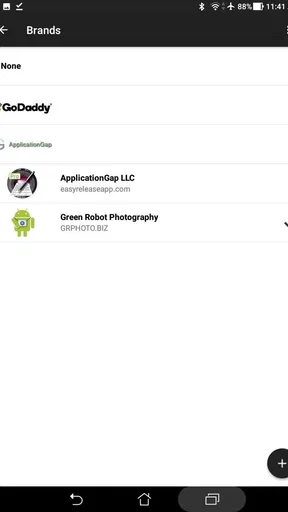
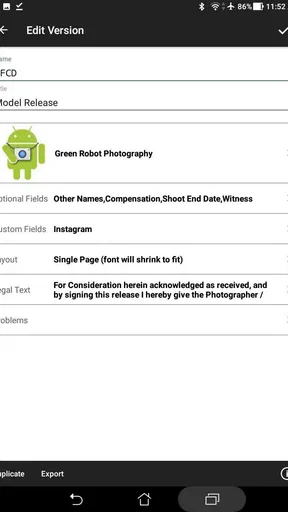
The app is aimed at photographers and other creatives who need model or property permissions, not at anyone looking for a general-purpose note-taking or document editor. It offers customizable forms, including options to add a logo and adapt legal text. Those choices are powerful, but they also create responsibility: I would keep a clean master version, make changes deliberately, and check the final form on screen before using it with a client.
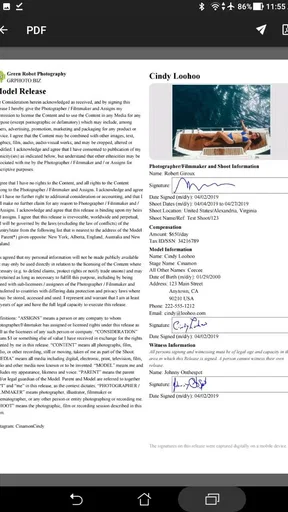
It is worth thinking about output before you start. Easy Release Pro can produce PDF and JPEG files, so choose the format that fits the next step in your workflow. A PDF is generally the sensible pick when you want a document to read or archive, while JPEG can be handy when an image-based copy is easier to pass along. Either way, open the saved result once to make sure it is legible and that the right release was exported.
Cloud storage can help when you need a release away from the device where it was created. I would treat that as convenience, not as a substitute for a backup plan or a clear filing system. If you work offline or in a location with unreliable connectivity, prepare what you can beforehand and confirm that the documents you need are available before leaving. A little pre-shoot checking is less disruptive than trying to sort out access with a subject waiting.
Recovering a workflow without adding stress
If something seems to go wrong, first pause and identify which step failed: preparing the form, completing the signature, exporting a copy, or finding a saved release. That sounds obvious, but it prevents you from repeating the whole process unnecessarily. Check the document on screen and your chosen output location before asking someone to sign again; duplicate signed forms can make later recordkeeping confusing.
For a busy shoot, I would make the release part of the call-sheet or shot-list routine rather than treating it as an afterthought. Confirm who needs to sign, have the appropriate form ready, and leave a moment to check the completed document before moving on. This is especially useful when photographing several people or locations in one session, where memory alone is a poor filing system.
Easy Release Pro has an average rating of 4.2 from around 860 ratings, with roughly 50 written reviews and over 10,000 installs. Those figures suggest a focused tool with an established audience, but they do not tell me whether it suits every shoot. I would judge it by how often releases are part of your work and how much time your current paper or generic-document routine costs you.
Streamlining the Release Process
First off, Easy Release Pro is a game-changer when it comes to simplifying the release process. Traditionally, getting a model or property release signed involved a lot of paperwork, which can be a hassle, especially if you're on a tight schedule. This app allows you to do everything digitally, which is not only convenient but also eco-friendly.
User-Friendly Interface
The user interface is intuitive and straightforward. Whether you're a seasoned photographer or just starting out, you'll find it easy to navigate. The app guides you through the process of creating and signing releases step-by-step, ensuring you don't miss any crucial information.
A cool feature is the ability to customize your release forms. You can add your logo, tailor the legal text to suit your needs, and even choose from multiple languages. This flexibility is ideal for those working internationally or aiming to maintain consistent branding.
Compatibility and Integration
One of the standout aspects of Easy Release Pro is its compatibility. It's available for both Android and iOS, which means you can use it across different devices without any hiccups. Plus, it integrates seamlessly with major platforms like Dropbox and Adobe Creative Cloud. This means you can easily save and share your releases where you need them most.
Security Features
Security is always a concern when handling sensitive information. The app ensures that your data is safe with encryption and password protection features. This gives you peace of mind that your releases—and your clients' information—are secure.
Pricing and Value
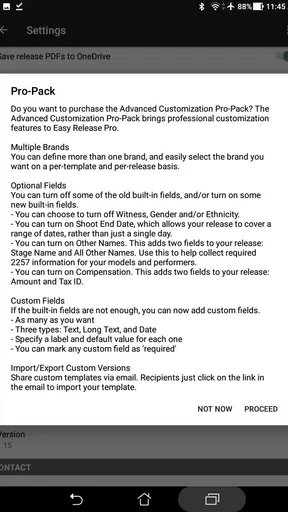
Now, let's talk about the price. It's not free, but when you consider the time and hassle it saves, it's a worthwhile investment. The app offers a one-time purchase option, which is great if you prefer to avoid recurring subscriptions.
Overall, Easy Release Pro provides excellent value for photographers, filmmakers, and other creatives who need to manage releases efficiently. It's user-friendly, secure, and packed with useful features that enhance productivity.
If you're tired of dealing with paper releases and want a more streamlined solution, this app is definitely worth considering. It's a small investment that can save you a lot of time and stress in the long run. So go ahead, give it a try and experience the convenience for yourself.
Choosing it over paper or a general document app
The useful comparison is not simply digital versus paper; it is a dedicated release workflow versus adapting a tool made for something else. Paper can be dependable when devices are unavailable, but it creates extra steps for filing, copying, and locating a signed form later. A generic PDF or document app may be enough if you only need an occasional signature and already have a form you trust. Easy Release Pro makes more sense when releases recur and you value guided creation, language choices, and output formats in one photography-focused process.
That convenience has a trade-off. A digital workflow depends on having the device ready, knowing where the completed file goes, and being comfortable reviewing forms on a screen. For a large production with a required legal template or a specific records system, I would check the workflow against those requirements before switching. The app can reduce administrative friction; it cannot decide whether a release meets a client’s or jurisdiction’s needs.
A realistic shoot-day routine
Imagine I am photographing a small team for a local business. Before the session, I would select and review the relevant form, add any appropriate branding, and make sure the language is right for the people signing. At the location, I would explain the release, let each person review it, and check the finished document before turning to the camera. Afterward, I would export a copy in the format that suits the client handoff and file it under the same project name I use for the images.
The non-obvious benefit is not just avoiding paper; it is making the release part of the production sequence. When I handle permissions before the first frame, I am less likely to interrupt a good moment later or wonder which person agreed to what. For property shoots, the same habit helps connect a location’s paperwork with the correct assignment. The app supports that routine, but consistent naming and a final check are what make it reliable over time.
Who will get the most from it
I would recommend this to working photographers, filmmakers, and small creative teams who regularly need model or property releases and want to keep the paperwork close to the shoot. It is particularly appealing if you work across languages or want a branded form rather than a stack of generic printouts. The Everyone content rating makes it suitable for a broad audience, though the actual forms still deserve careful adult attention when legal permissions are involved.
On the other hand, I would skip it if you rarely collect releases, already have a dependable digital signing system, or need a broader contract-management platform. Paying for a specialized tool is harder to justify when a simple paper form does the job once in a while. Easy Release Pro is priced at $12.99, with in-app purchases ranging from $3.99 to $5.99 per item, so I would check the purchase options shown on your device and decide whether its regular use offsets the cost. It runs on Android from version 8.0, and its current version is 4.1.260404.
When the problem may be outside the app
If a release is missing, I would first check the project name, the format I exported, and the place where I normally store finished files. If cloud access is part of the workflow, I would also check connectivity and account access before assuming the document has disappeared. These are practical checks rather than a guarantee that every issue has the same cause; they help isolate whether the trouble is with preparation, saving, or retrieval.
Likewise, an unexpectedly unsuitable form may be a setup issue rather than a signing problem. I would revisit the selected template and any custom legal wording, then confirm that the version presented to the subject is the intended one. If a client has supplied mandatory wording, I would compare the final release against it before a shoot instead of trying to repair the paperwork afterward. For legal questions, professional advice is a better choice than relying on an app to interpret the rules.
My practical verdict
Easy Release Pro is a focused photography utility, not a replacement for every document or business tool. Its best value appears when release collection is a repeatable part of paid work: create a suitable form, collect signatures, and keep a readable copy connected to the assignment. The app has been available since April 10, 2019, and its 4.1.260404 version reflects a product with a continuing release history, though I would still check that the version on my device works with my own routine.
I would choose it when the cost of chasing paper and sorting scattered permissions is a regular annoyance. I would stay with paper or a general document app if my needs were occasional and already well organized. That is the honest dividing line: Easy Release Pro can make release handling feel less improvised, but the quality of the result still depends on choosing the right form, explaining it clearly, and checking where the signed copy ends up.
Verdict
Strengths of Easy Release Pro
- Intuitive interface for easy navigation.
- Customizable templates for various needs.
- Secure storage of signed releases.
- Works offline without connectivity issues.
- Supports multiple languages for diversity.
Limitations of Easy Release Pro
- Limited free features, more in paid version.
- Occasional sync issues with cloud storage.
- No integration with some popular apps.
- Requires registration for full functionality.
- Lacks advanced editing tools for documents.
Similar Picks in This Category
View All
Google Photos
Google LLC4.4

Gallery
Google LLC4.2

Picsart AI Photo Editor, Video
PicsArt, Inc.3.9

B612 AI Photo&Video Editor
SNOW Corporation4.1

BeautyPlus-Selfie Photo Editor
PIXOCIAL TECHNOLOGY (SINGAPORE) PTE. LTD.4.5

Remini - AI Photo Enhancer
Bending Spoons4.1
Frequently Asked Questions
What is Easy Release Pro used for?
Easy Release Pro is a mobile app designed for photographers and videographers to create and manage model and property release forms. It simplifies the process of obtaining legal permissions, ensuring that shoots are compliant with industry standards. The app is particularly useful for professionals who frequently work with models or on location.
Is Easy Release Pro available on both Android and iOS?
Yes, Easy Release Pro is available for download on both Android and iOS platforms. Users can find it on the Google Play Store and the Apple App Store, making it accessible for a wide range of mobile devices. Ensure your device meets the app’s system requirements before downloading.
Does Easy Release Pro require an internet connection?
Easy Release Pro does not require an internet connection for creating or managing release forms. However, an internet connection is needed for certain features such as cloud storage integration and sending documents via email. Users can work offline and sync their data when connected.
Can I customize the release forms in Easy Release Pro?
Yes, Easy Release Pro allows users to customize release forms to fit their specific needs. Users can add their branding, adjust terms, and include additional clauses. This flexibility ensures that the forms meet legal requirements and align with individual or company standards.
How secure is the data stored in Easy Release Pro?
Easy Release Pro prioritizes the security of user data by implementing robust encryption measures. Users can also integrate with secure cloud storage solutions for backup purposes. It’s recommended to regularly update the app to benefit from the latest security enhancements and features.
